Quick Math Calculator - Plugin

Quick Math Calculator
Download | Discord Server

RobloxStudioBeta_9awjc8h6dr

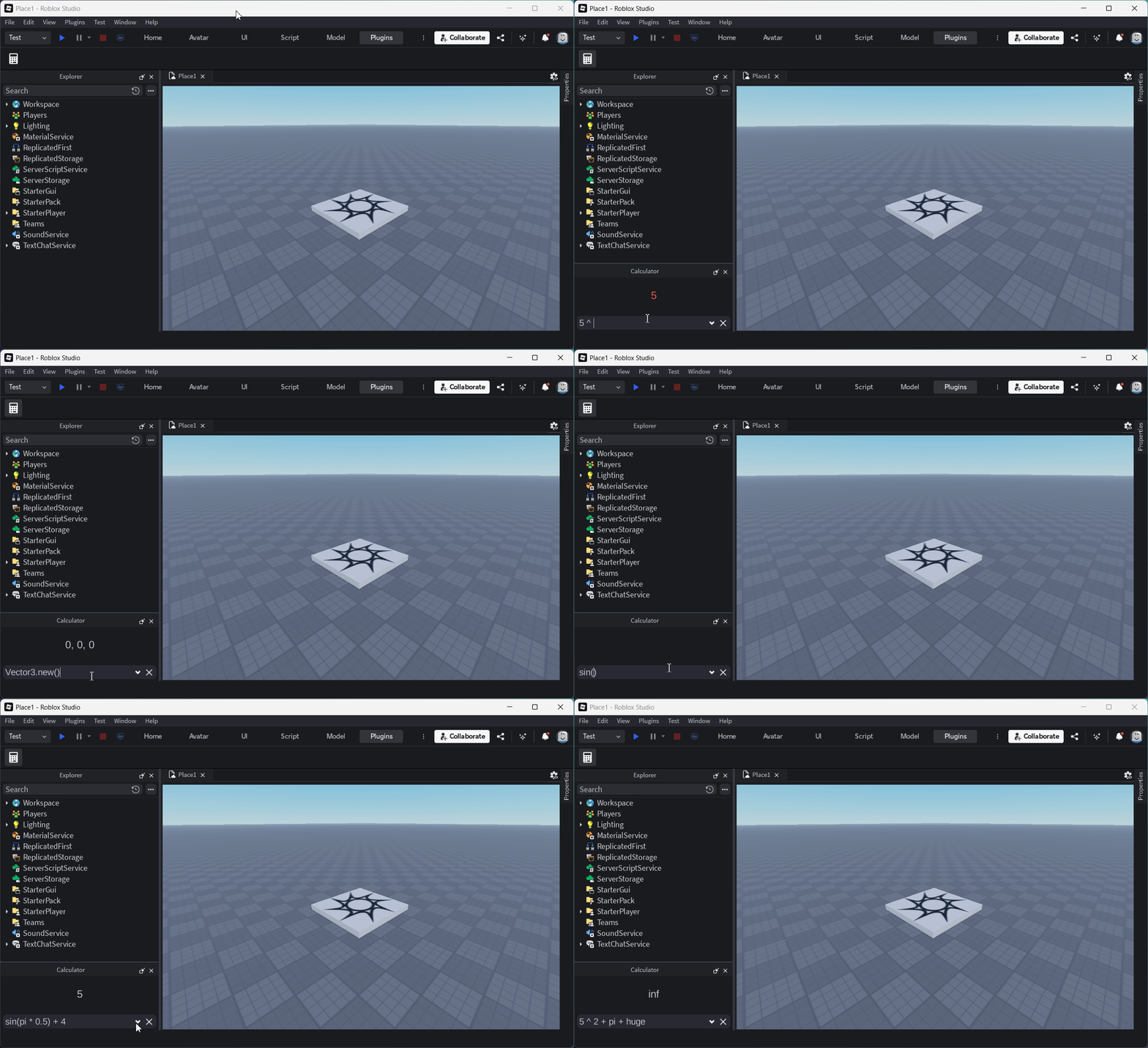
A dockable calculator. Type math or Luau expressions and get instant results.
RobloxStudioBeta_AKpvwq5Tii
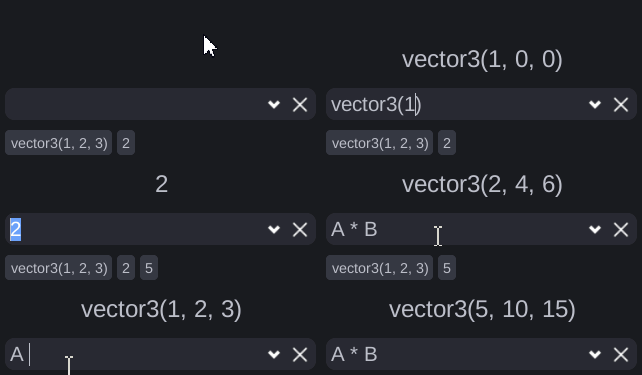
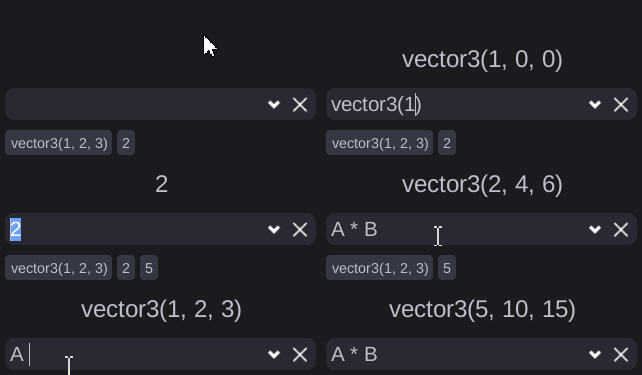
Enter - to save to history
Left Click - Insert variable into input
Right Click - delete from history


Support My Work

If you liked my work and want to donate to me you can do so here


SourceCode

--!strict

local characterTypes = {
	a = "Alphabet", b = "Alphabet", c = "Alphabet", d = "Alphabet", e = "Alphabet", f = "Alphabet", g = "Alphabet", h = "Alphabet", i = "Alphabet", j = "Alphabet", k = "Alphabet", l = "Alphabet", m = "Alphabet",
	n = "Alphabet", o = "Alphabet", p = "Alphabet", q = "Alphabet", r = "Alphabet", s = "Alphabet", t = "Alphabet", u = "Alphabet", v = "Alphabet", w = "Alphabet", x = "Alphabet", y = "Alphabet", z = "Alphabet",
	A = "Alphabet", B = "Alphabet", C = "Alphabet", D = "Alphabet", E = "Alphabet", F = "Alphabet", G = "Alphabet", H = "Alphabet", I = "Alphabet", J = "Alphabet", K = "Alphabet", L = "Alphabet", M = "Alphabet",
	N = "Alphabet", O = "Alphabet", P = "Alphabet", Q = "Alphabet", R = "Alphabet", S = "Alphabet", T = "Alphabet", U = "Alphabet", V = "Alphabet", W = "Alphabet", X = "Alphabet", Y = "Alphabet", Z = "Alphabet",
	_ = "Alphabet", ["0"] = "Digit", ["1"] = "Digit", ["2"] = "Digit", ["3"] = "Digit", ["4"] = "Digit", ["5"] = "Digit", ["6"] = "Digit", ["7"] = "Digit", ["8"] = "Digit", ["9"] = "Digit",
}

local map = {
	-- math
	abs="math.abs", acos="math.acos", asin="math.asin", atan="math.atan", atan2="math.atan2",
	ceil="math.ceil", clamp="math.clamp", cos="math.cos", cosh="math.cosh", deg="math.deg",
	exp="math.exp", floor="math.floor", fmod="math.fmod", frexp="math.frexp", ldexp="math.ldexp",
	lerp="math.lerp", log="math.log", log10="math.log10", map="math.map", max="math.max",
	min="math.min", modf="math.modf", noise="math.noise", pow="math.pow", rad="math.rad",
	random="math.random", round="math.round", sign="math.sign", sin="math.sin", sinh="math.sinh",
	sqrt="math.sqrt", tan="math.tan", tanh="math.tanh", huge="math.huge", pi="math.pi",
	
	-- bit32
	arshift="bit32.arshift", band="bit32.band", bnot="bit32.bnot",
	bor="bit32.bor", btest="bit32.btest", bxor="bit32.bxor",
	byteswap="bit32.byteswap", countlz="bit32.countlz", countrz="bit32.countrz",
	extract="bit32.extract", replace="bit32.replace", lrotate="bit32.lrotate",
	lshift="bit32.lshift", rrotate="bit32.rrotate", rshift="bit32.rshift",
	
	-- constructors
	vector="vector.create", vector2="Vector2.new", vector3="Vector3.new",
	cframe="CFrame.new", udim="UDim.new", udim2="UDim2.new", color3="Color3.new",
}

local theme = settings().Studio.Theme :: any
local mainText = theme:GetColor(Enum.StudioStyleGuideColor.MainText)
local errorText = theme:GetColor(Enum.StudioStyleGuideColor.ErrorText)

local toolbar = plugin:CreateToolbar("Quick Math Calculator")
local button = toolbar:CreateButton("Calculator", "Quick Math Calculator", "rbxassetid://85861816563977")
button.ClickableWhenViewportHidden = true

local widgetInfo = DockWidgetPluginGuiInfo.new(Enum.InitialDockState.Float, false, false, 120, 40)
local widget = plugin:CreateDockWidgetPluginGui("Quick Math Calculator", widgetInfo)
widget.Title = "Calculator"

local historyFrame = Instance.new("Frame")
historyFrame.Position = UDim2.new(0, 4, 0, 4)
historyFrame.Size = UDim2.new(1, -8, 0, 20)
historyFrame.BackgroundTransparency = 1
historyFrame.Parent = widget

local listLayout = Instance.new("UIListLayout")
listLayout.Padding = UDim.new(0, 4)
listLayout.FillDirection = Enum.FillDirection.Horizontal
listLayout.Parent = historyFrame

local outputBox = Instance.new("TextBox")
outputBox.TextSize = 14
outputBox.TextColor3 = mainText
outputBox.Position = UDim2.new(0, 0, 0, 28)
outputBox.Size = UDim2.new(1, 0, 1, -62)
outputBox.BackgroundTransparency = 1
outputBox.ClearTextOnFocus = false
outputBox.Text = ""
outputBox.Parent = widget

local frame = Instance.new("Frame")
frame.Position = UDim2.new(0, 4, 1, -30)
frame.Size = UDim2.new(1, -8, 0, 26)
frame.BackgroundColor3 = theme:GetColor(Enum.StudioStyleGuideColor.InputFieldBackground)
frame.Parent = widget

local corner = Instance.new("UICorner")
corner.CornerRadius = UDim.new(0, 8)
corner.Parent = frame

local inputBox = Instance.new("TextBox")
inputBox.TextSize = 12
inputBox.TextColor3 = mainText
inputBox.Position = UDim2.new(0, 4, 0, 0)
inputBox.Size = UDim2.new(1, -50, 1, 0)
inputBox.BackgroundTransparency = 1
inputBox.ClearTextOnFocus = false
inputBox.TextXAlignment = Enum.TextXAlignment.Left
inputBox.Text = ""
inputBox.Parent = frame

local import = Instance.new("ImageButton")
import.Image = "rbxasset://textures/ui/MenuBar/arrow_down.png"
import.Position = UDim2.new(1, -42, 1, -21)
import.Size = UDim2.new(0, 16, 0, 16)
import.BackgroundTransparency = 1
import.ScaleType = Enum.ScaleType.Fit
import.Parent = frame

local clear = Instance.new("ImageButton")
clear.Image = "rbxasset://textures/StudioSharedUI/close.png"
clear.Position = UDim2.new(1, -21, 1, -21)
clear.Size = UDim2.new(0, 16, 0, 16)
clear.BackgroundTransparency = 1
clear.ScaleType = Enum.ScaleType.Fit
clear.Parent = frame

local lastCursor = -1
local lastSelection = -1
local historyButtons = {} :: {TextButton}

local function Calculate()
	local index = 1
	local inject = {}
	local tokens = {}

	for index, button in historyButtons do
		table.insert(inject, "local")
		table.insert(inject, string.char(64 + index))
		table.insert(inject, "=")
		table.insert(inject, button.Text)
	end
	table.insert(inject, "return")
	table.insert(inject, inputBox.Text)

	local source = table.concat(inject, " ")
	while true do
		local startIndex: any, endIndex: any, character: any = source:find("(%S)", index)
		if character == nil then break end
		local characterType = characterTypes[character]
		if characterType == "Alphabet" then
			local startIndex: any, endIndex: any, characters: any = source:find("(.[%w_]*)", endIndex)
			index = endIndex + 1
			table.insert(tokens, characters)
		elseif characterType == "Digit" then
			local startIndex: any, endIndex: any, characters: any = source:find("(.[%d_.]*)", endIndex)
			index = endIndex + 1
			table.insert(tokens, characters)
		else
			index = endIndex + 1
			table.insert(tokens, character)
		end
	end

	for index, token in tokens do
		if tokens[index - 1] == "." then continue end
		local mapped = map[token]
		if mapped then tokens[index] = mapped end
	end

	local func = loadstring(table.concat(tokens, " "))
	if func == nil then outputBox.TextColor3 = errorText return end
	local success, value = pcall(func)
	if success == false then outputBox.TextColor3 = errorText return end
	if typeof(value) == "function" then outputBox.TextColor3 = errorText return end
	if typeof(value) == "table" then outputBox.TextColor3 = errorText return end
	outputBox.TextColor3 = mainText
	if typeof(value) == "Vector2" then outputBox.Text = "vector2(" .. tostring(value) .. ")" return end
	if typeof(value) == "Vector3" then outputBox.Text = "vector3(" .. tostring(value) .. ")" return end
	if typeof(value) == "CFrame" then outputBox.Text = "cframe(" .. tostring(value) .. ")" return end
	if typeof(value) == "UDim" then outputBox.Text = "udim(" .. tostring(value) .. ")" return end
	if typeof(value) == "UDim2" then outputBox.Text = "udim2(" .. tostring(value) .. ")" return end
	if typeof(value) == "Color3" then outputBox.Text = "color3(" .. tostring(value) .. ")" return end
	if typeof(value) == "nil" then outputBox.Text = "" return end
	outputBox.Text = tostring(value)
end

local function History(value)
	local button = Instance.new("TextButton")
	button.Text = value
	button.Size = UDim2.new(0, 0, 1, 0)
	button.AutomaticSize = Enum.AutomaticSize.X
	button.TextColor3 = theme:GetColor(Enum.StudioStyleGuideColor.ButtonText)
	button.BackgroundColor3 = theme:GetColor(Enum.StudioStyleGuideColor.Button)
	button.Parent = historyFrame
	button.MouseButton1Down:Connect(function()
		local letter = string.char(64 + table.find(historyButtons, button) :: any)
		if lastCursor == -1 then
			inputBox.Text ..= letter
			inputBox:CaptureFocus()
		elseif lastSelection == -1 then
			inputBox.Text = inputBox.Text:sub(1, lastCursor - 1) .. letter .. inputBox.Text:sub(lastCursor)
			inputBox.CursorPosition = lastCursor + 1
		else
			local min = math.min(lastCursor, lastSelection)
			local max = math.max(lastCursor, lastSelection)
			inputBox.Text = inputBox.Text:sub(1, min - 1) .. letter .. inputBox.Text:sub(max)
			inputBox.CursorPosition = min + 1
		end
	end)
	button.MouseButton2Click:Connect(function()
		table.remove(historyButtons, table.find(historyButtons, button))
		button:Destroy()
		Calculate()
	end)

	local corner = Instance.new("UICorner")
	corner.CornerRadius = UDim.new(0, 4)
	corner.Parent = button

	local padding = Instance.new("UIPadding")
	padding.PaddingLeft = UDim.new(0, 4)
	padding.PaddingRight = UDim.new(0, 4)
	padding.Parent = button
	
	table.insert(historyButtons, button)
end

button:SetActive(widget.Enabled)
button.Click:Connect(function()
	if widget.Enabled then
		widget.Enabled = false
	else
		widget.Enabled = true
		task.wait(0.1)
		inputBox:CaptureFocus()
	end
end)

widget:GetPropertyChangedSignal("Enabled"):Connect(function()
	button:SetActive(widget.Enabled)
end)

inputBox:GetPropertyChangedSignal("Text"):Connect(Calculate)

inputBox:GetPropertyChangedSignal("CursorPosition"):Connect(function()
	task.wait()
	lastCursor = inputBox.CursorPosition
end)

inputBox:GetPropertyChangedSignal("SelectionStart"):Connect(function()
	task.wait()
	lastSelection = inputBox.SelectionStart
end)

inputBox.FocusLost:Connect(function(enter, input)
	if enter == false then return end
	History(outputBox.Text)
	local restoreCursor = lastCursor
	local restoreSelection = lastSelection
	task.wait()
	inputBox.CursorPosition = restoreCursor
	inputBox.SelectionStart = restoreSelection
end)

import.MouseButton1Click:Connect(function()
	if outputBox.Text ~= "" then inputBox.Text = outputBox.Text end
end)

clear.MouseButton1Click:Connect(function()
	inputBox.Text = ""
end)

Permission to use, copy, modify, and/or distribute this software for any purpose with or without fee is hereby granted.


20 Likes

Bro’s cooking as always peak plugin, keep up the good work also love ur videos :wink:

command line does the same thing

1 Like

The command bar takes too much time especially with the new UI, while this plugin provides instant, real-time results.

I don’t wanna do print(some calculation) and move my mouse across the screen to click that execute button.

1 Like

its faster to just use the command line instead of going all the way to your plugins and opening anew widget to bloat your screen and doing basic math in it. Also the command line has auto complete which just makes writing out the equations faster when using math functions.

its called press enter on your keyboard?

You don’t even need auto complete if you are an experienced programmer especially for maths related stuff, and you have to open widget only once.

Its now CTRL + Enter

Command bar doesn’t let you use your output as a new value for maths, It looks like you commented without even testing the plugin.

I didnt say you needed it. I said it made writing out the equations faster, which it literally would.. thats not even a debate

Id rather not fill my screen space with random plugins that you only use 1% of the time

oh no! not one extra button press that your finger is already hovering next to anyways :scream:

no, i seen it. Its just ive not once in my life been in a situation where i would ever need that

1 Like

you don’t need to go to the plugin tab you can map the button to a keyboard shortcut like Alt+C to quickly toggle the window

its true that you can do the same thing with the command bar but with some small differences for example with the command bar you must also have access the the output window

also this has some shortcuts for example on the command bar you would enter
print(math.sin(math.pi * 0.5))
vs with the plugin you enter
sin(pi * 0.5)

also the plugin is more forgiving with typos as it does not clear the input to give you the result

also this is still version 1 that only has basic features at this time but hopefully could be extended to include more features like graphs, benchmarks etc…

this plugin was made for myself so that when i record tutorial videos it can help me explain formulars to viewers but i do see its usefulness so i felt it would be a benefit to the Roblox community to share for anyone that wants to use it

if this plugin is not for you that’s fine its not a mandatory plugin that everyone must use

also as a side note as its a reasonably simple plugin and open source its a good resource for people making there very first plugin to use the source code as a reference

3 Likes

Being able to store a record of calculations would be nice, like lets say i input sin(rad 0.882) and then click some button to assign the expression + the result a name, then i can access that later whenever i need it, probably useful for some math stuff where you need to remember and compute numbers from constants alot

Would be nice if you could also use the stuff youve saved in calculator expressions, like lets say i save 10 + 1 as var then i calculate var + 10 it would give me 21

Lastly just a history of calculations to make sure you can find whatever you calculated in the past if you need that

history with save and restore buttons are on my todo list

variables is also a good feature but will be a little more complex to implement so i need to think of a elegant way i can implement variables

1 Like

Hi, heres a little parser i whipped up

-- CalcScript Parser
-- By athar_adv
type TokenType = "identifier" | "paren_open" | "paren_close" | "num" | "operator" | "comma"
type Token = {ty: TokenType, value: string}

local ins = table.insert

return function(variables: {[string]: number}, funcs: {[string]: (...number) -> number}, expr: string)
	local tokens: {Token} = {}
	local chars = expr:split("")
	local i = 1

	while i <= #chars do
		local char = chars[i]
		if char:match("%s") then
			i += 1
		elseif char == "0" and i < #chars and (chars[i+1] == "x" or chars[i+1] == "b") then
			-- Hexadecimal (0x) or Binary (0b)
			local prefix = chars[i+1]
			i += 2
			local num = ""
			if prefix == "x" then
				while i <= #chars and chars[i]:match("[%x]") do
					num ..= chars[i]
					i += 1
				end
				ins(tokens, {ty = "num", value = tostring(tonumber(num, 16))})
			else -- binary
				while i <= #chars and chars[i]:match("[01]") do
					num ..= chars[i]
					i += 1
				end
				ins(tokens, {ty = "num", value = tostring(tonumber(num, 2))})
			end
		elseif char:match("%d") then
			local num = ""
			while i <= #chars and (chars[i]:match("%d") or chars[i] == ".") do
				num ..= chars[i]
				i += 1
			end
			ins(tokens, {ty = "num", value = num})
		elseif char:match("[%a_]") then
			local ident = ""
			while i <= #chars and chars[i]:match("[%w_]") do
				ident ..= chars[i]
				i += 1
			end
			ins(tokens, {ty = "identifier", value = ident})
		elseif char == "(" then
			ins(tokens, {ty = "paren_open", value = char})
			i += 1
		elseif char == ")" then
			ins(tokens, {ty = "paren_close", value = char})
			i += 1
		elseif char == "," then
			ins(tokens, {ty = "comma", value = char})
			i += 1
		elseif char == "/" and chars[i + 1] == "/" then
			ins(tokens, {ty = "operator", value = "//"})
			i += 2
		elseif char == ">" and chars[i + 1] == ">" then
			ins(tokens, {ty = "operator", value = ">>"})
			i += 2
		elseif char == "<" and chars[i + 1] == "<" then
			ins(tokens, {ty = "operator", value = "<<"})
			i += 2
		elseif char == "~" and chars[i + 1] == "|" then
			ins(tokens, {ty = "operator", value = "~|"})
			i += 2
		elseif char == ">" and chars[i + 1] == ">" and chars[i + 2] == "<" then
			ins(tokens, {ty = "operator", value = ">><"})
			i += 3
		elseif char == ">" and chars[i + 1] == "<" and chars[i + 2] == "<" then
			ins(tokens, {ty = "operator", value = "><<"})
			i += 3
		elseif char:match("[+%-%*/^%%&|~]") then
			ins(tokens, {ty = "operator", value = char})
			i += 1
		else
			error(`Unknown character: '{char}'`)
		end
	end
	
	local parseExpression
	local pos = 1

	local function peek(): Token?
		return tokens[pos]
	end

	local function consume(): Token
		local token = tokens[pos]
		pos += 1
		return token
	end
	
	local function parsePrimary(): number
		local token = peek()
		if not token then
			error("Unexpected end of expression")
		end

		if token.ty == "num" then
			consume()
			return tonumber(token.value)
		elseif token.ty == "identifier" then
			local name = consume().value

			-- Check if it's a function call with parentheses
			if peek() and peek().ty == "paren_open" then
				consume() -- consume '('
				local args = {}

				if peek() and peek().ty ~= "paren_close" then
					ins(args, parseExpression())
					while peek() and peek().ty == "comma" do
						consume() -- consume ','
						ins(args, parseExpression())
					end
				end

				if not peek() or peek().ty ~= "paren_close" then
					error("Expected closing parenthesis")
				end
				consume() -- consume ')'

				local func = funcs[name]
				if not func then
					error(`Unknown function: '{name}'`)
				end
				return func(table.unpack(args))

				-- Check if it's a parenthesesless function call (function followed by a number/expression)
			elseif funcs[name] and peek() and (peek().ty == "num" or peek().ty == "identifier" or peek().ty == "paren_open") then
				local arg = parsePrimary()
				return funcs[name](arg)
			else
				local var = variables[name]
				if var == nil then
					error("Unknown variable: " .. name)
				end
				return var
			end
		elseif token.ty == "paren_open" then
			consume()
			local result = parseExpression()
			if not peek() or peek().ty ~= "paren_close" then
				error("Expected closing parenthesis")
			end
			consume()
			return result
		else
			error(`Unexpected token: '{token.value}'`)
		end
	end
	
	local function parseUnary(): number
		if peek() and peek().ty == "operator" then
			if peek().value == "-" or peek().value == "+" then
				local op = consume().value
				local val = parseUnary()
				return op == "-" and -val or val
			elseif peek().value == "~" then
				consume() -- consume '~'
				return bit32.bnot(parseUnary())
			end
		end
		return parsePrimary()
	end
	
	local function parsePower(): number
		local left = parseUnary()
		if peek() and peek().ty == "operator" and peek().value == "^" then
			consume()
			local right = parsePower()
			left ^= right
		end
		return left
	end
	
	local function parseMulDiv(): number
		local left = parsePower()
		while peek() and peek().ty == "operator" and (peek().value == "*" or peek().value == "/" or peek().value == "%" or peek().value == "//") do
			local op = consume().value
			local right = parsePower()
			if op == "*" then
				left *= right
			elseif op == "/" then
				left /= right
			elseif op == "//" then
				left //= right
			elseif op == "%" then
				left %= right
			else
				error(`Unknown operator: '{op}'`)
			end
		end
		return left
	end

	local function parseAddSub(): number
		local left = parseMulDiv()
		while peek() and peek().ty == "operator" and (peek().value == "+" or peek().value == "-") do
			local op = consume().value
			local right = parseMulDiv()
			if op == "+" then
				left = left + right
			else
				left = left - right
			end
		end
		return left
	end
	
	local function parseBitAnd(): number
		local left = parseAddSub()
		while peek() and peek().ty == "operator" and (peek().value == "&") do
			local op = consume().value
			local right = parseAddSub()
			left = bit32.band(left, right)
		end
		return left
	end
	
	local function parseBitOr(): number
		local left = parseBitAnd()
		while peek() and peek().ty == "operator" and (peek().value == "|" or peek().value == "~|") do
			local op = consume().value
			local right = parseBitAnd()
			if op == "|" then
				left = bit32.bor(left, right)
			elseif op == "~|" then
				left = bit32.bxor(left, right)
			end
		end
		return left
	end
	
	local function parseBitShift(): number
		local left = parseBitOr()
		while peek() and peek().ty == "operator" and (peek().value == "<<" or peek().value == ">>" or peek().value == ">><" or peek().value == "><<") do
			local op = consume().value
			local right = parseBitOr()
			if op == ">>" then
				left = bit32.rshift(left, right)
			elseif op == "<<" then
				left = bit32.lshift(left, right)
			elseif op == ">><" then
				left = bit32.rrotate(left, right)
			elseif op == "><<" then
				left = bit32.lrotate(left, right)
			end
		end
		return left
	end
	
	function parseExpression(): number
		return parseBitShift()
	end

	local result = parseExpression()

	if peek() then
		error(`Unexpected token after expression: '{peek().value}'`)
	end

	return result
end

It’s called CalcScript and allows you to do stuff like this

sin rad 90 -> returns 1
sqrt 2 + 5 - max(1, 2)

And even supports bitwise ops and variables
This allows you to replace loadstring in your plugin which means it can be publicly distributed as a marketplace plugin instead of a rbxm or source code which you have to import manually
The expression is also automatically sandbox since you cant do anything but calculate math expressions

Thanks for sharing i was trying my best to not have to implement a custom parser because one of my goals is to keep it compatible with luau code so you can simply copy and paste code directly from your scripts into the plugin

i had no problems distributing the plugin

but still thanks for sharing should be reasonably simple for someone to implement your parser if they so choose to

1 Like

Hi, yes it should stay up for a bit but atleast from my experience ai moderation tends to take it down after a bit :V If you have issues with that youd need to implement a custom parser

thats strange because i have another plugin that i distributed on Oct 21, 2022

https://create.roblox.com/store/asset/11329980016/Infinite-Scripter

and it also uses loadstring but it has not been taken down

:up_arrow: Update

RobloxStudioBeta_AKpvwq5Tii

Enter - to save to history
Left Click - Insert variable into input
Right Click - delete from history

Added history
Added variables
Added more shortcuts -- vector3(), cframe(), lshift(), and more
Fixed shortcut detection -- math.pi, math.etc... now works
Fixed importing -- importing vectors, cframes, etc... now works
1 Like

I was planning on making a plugin like this because using the command bar is so annoying :sob:
Great work :+1: