Bring your Roblox Studio Explorer directly into VS Code – no need for Rojo!
View your project structure (Services, Folders, Scripts…) live in real-time while working in Roblox Studio
I created RoExplorer Live because I was using Roblox’s Studio Script Sync and I hated constantly switching back and forth between Roblox Studio and VS Code
This plugin solves that problem by letting you see your Explorer in VS Code without ever leaving your editor
Features
Real-time sync – See changes in Roblox Studio instantly in VS Code.
Full Explorer view – Access all services like Workspace, ReplicatedFirst, ReplicatedStorage, ServerScriptService, and more.
Scripts in the Explorer now open directly in VS Code with a double-click
Built-in automatic sync
Any changes saved in VS Code are automatically reflected in Roblox Studio
No Rojo required – Works out of the box without extra tools.
The default script editor is really good for beginners but if you’re even remotely invested in scripting professionally you will use something like Visual Studio.
I also have the niche case of running a full local LLM system and run dual models of a custom trained GPT-OSS-120b on a LuaU dataset as well as a version of Qwen2.5 Coder trained on LuaU for asynchronous autocomplete suggestions.
Note you would require around 90GB of VRAM for this setup so it’s not for most people.
This is really cool and the way you describe it sounds a little too good to be true as a pretty straightforward setup, is there any caveats to your system?
“I must use vscode to be like the professionals” “I must use git to be like the professionals” “I must use wally to be like the professionals” “I must use rojo to be like the professionals”
all of this is just bloat. No, using 3rd party apps/systems does NOT make you a professional. And saying that you need to use vscode to “remotely be a professional” is a losers mentality.
im sorry you fell for the bait to “be a professional” and to “do what the professionals do”, i hope you get well soon
Vscode is just a nicer experience overall. I’ve come to hate how Rojo works (local has authority and there is no way to get it to sync from the game) and likely will never use it again but having version control with Git and being able to use VSCode is nice.
First of all he never said that VSCode is required to program professionally. There are “professional” programmers who only use notepad to program. That does not change the fact that VS Code is a far more advanced editor than Roblox Studio’s default.
Second, there is no reason to be opposed to anything thats not the default script editor. I dont even understand how you can defend it because of how slow it is. Like this is a community resource, if it makes you so upset just go to a different post instead of writing this nonsense.
Nobody is forcing you to use VSCode and if you had a hard time with it then thats on you not being able to integrate it into your dev workflow.
Also! I promise you cannot have your Roblox editor looking like this with VIM controls and custom actions with integrated Git controls as well. This personally works very well for me and is far more responsive than the Roblox Editor.
Clearly the first few words struck a nerve and caused you to be incapable of comprehending the point I was trying to make.
No, you do not need to use Visual Studio to be a professional - but there is tool kits and custom deployed solutions that will greatly enhance your ability and speed to develop.
These custom solutions are simply unavailable with the Roblox script editor and there is no way to support them.
This is my platform with horrible SVM which holds absolutely no guardrails and if I need to update something I have to hold a back up place to then work there and copy over the release place to publish. That or allow any collaborator to push whatever they want without any approval.
Yes, Roblox has the best SVM! Security? Lowest Privilege? What is that? Nah, this is Roblox studio, the beat game engine and the best source control!
Screw learning things that may help me in the future with other projects outside of the walled garden! Screw learning good practices like branches and pull requests! Screw learning how to handle and work with collaborators who shouldn’t have all game access!
Will you ever consider making this tool work with Rojo-style sourcemap.json files (that could be generated by another tool, not Rojo) rather than with the dedicated plugin?
Yes you can
You can work on your scripts without having Roblox Studio open
When you open Studio again, just use Resume Sync and choose which version to keep (Disk or Studio)
 Roblox Explorer in VS Code
 Real-time sync – See changes in Roblox Studio instantly in VS Code.
 Custom icon themes – Choose your favorite style for the Explorer icons.
 Scripts in the Explorer now open directly in VS Code with a double-click
 No Rojo required – Works out of the box without extra tools.
 GIF Demonstrations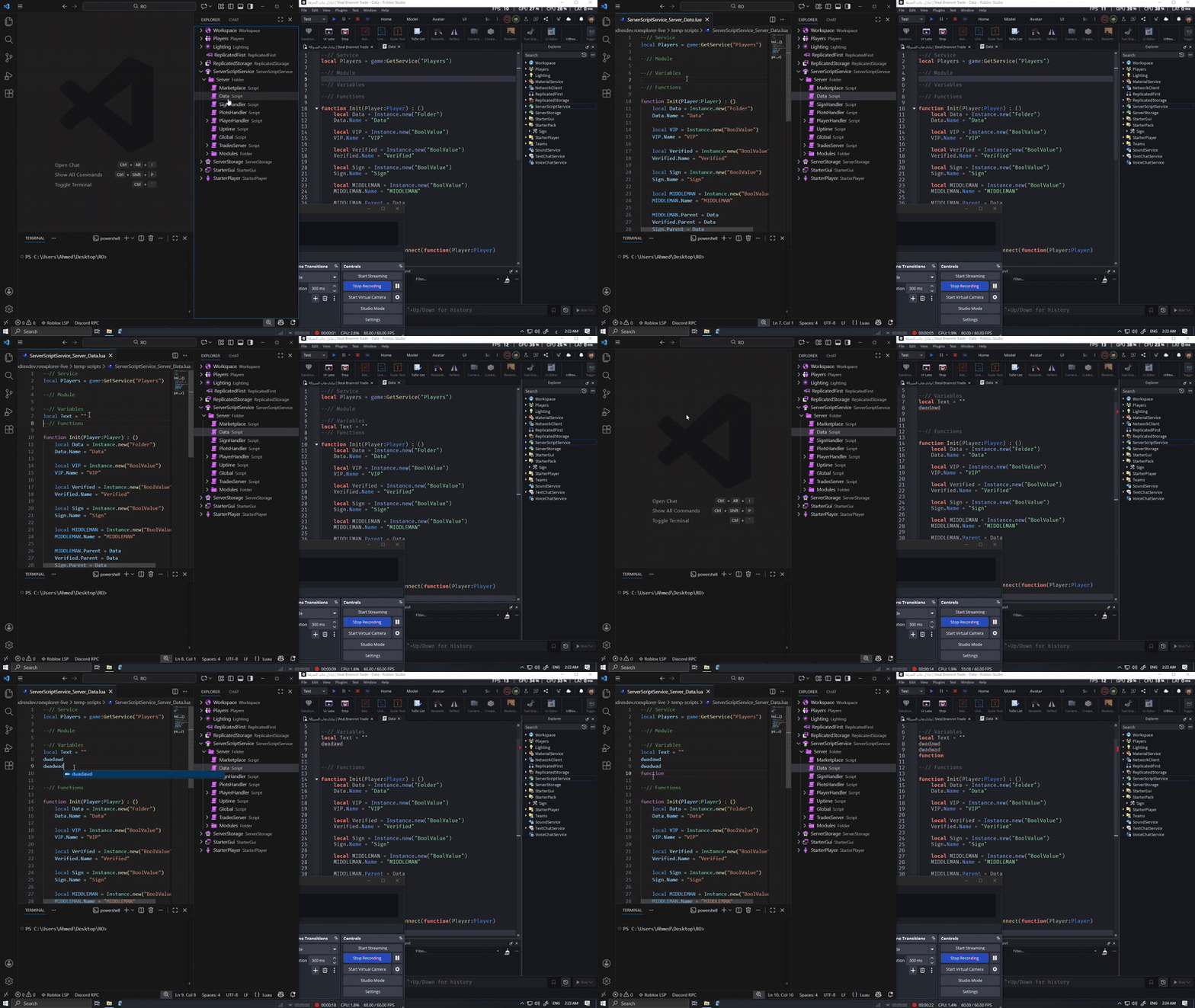


 Links
Links Update :


 it really is that simple No caveats at the moment

