[Update] March 18, 2026
[Update] March 11, 2026
[Update] January 23rd, 2026
[Update] December 8th, 2025
[Update] November 6th, 2025
Hi creators,
We’re excited to announce the Makeup Studio Beta, a new feature that lets you create and apply makeup seamlessly to Dynamic Heads on Roblox! It’s made possible with two new APIs available in Studio beta for you to experiment with: WrapTextureTransfer and AssetService:ComposeDecalAsync Here’s what you can look forward to in this beta:
- Universal Fit: The WrapTextureTransfer instance works with the existing layered clothing cage-based fitting system. This means a single makeup texture can be authored once and then automatically applied and fitted to any head with a correctly set up cage. This ensures your makeup is compatible and looks great on diverse avatars.
- High Performance: Use the AssetService:ComposeDecalAsync API to layer multiple makeup textures—like lipstick, eyeshadow, and blush—and “flatten” them into a single, high-performance decal. This is crucial because it allows you to combine multiple makeup layers without substantially increasing the memory or bandwidth used per avatar.
- Flexible Importing: The import flow has also been updated.
- Reference Head Samples: Makeup authored on a reference head mesh (samples in the “ReferenceHead” folder) will automatically be transferred to the cage UV space during import.
- Cage Mesh Samples: Makeup authored directly on the cage mesh (samples in the “ReferenceCage” folder) can also be imported.

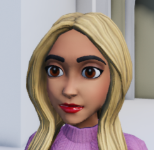
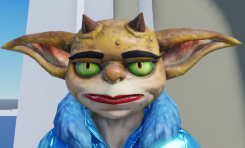
How to Get Started
You can start experimenting with the Makeup Studio Beta right now in Studio! Navigate to File > Beta Features and check the box for `Avatar Makeup` and restart Studio. We’ve included a place file with several different avatars and sample makeup assets you can apply to them.
[Updated 10/3/25] Importing and Applying Makeup
- Name Your Nodes: When importing, name certain nodes with special prefixes:
- The reference head mesh and its outer cage mesh must be named with the prefix “TransferTarget_”.
- Each makeup layer mesh should be named with the prefix “TransferTexture_”. These will be imported as Decals with a
WrapTextureTransferchild. Check out the learning documentation for more on how to create your own makeup.

- Preview Your Layers (No Code Required): We are providing a script in the beta so you can preview your makeup layers on different heads without writing any code.
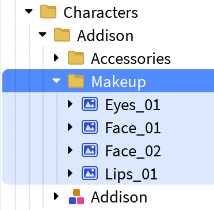
- Just import your makeup and place it in the designated folder.
- Note: When you import onto the template Head, the makeup won’t appear on the template Head in the experience. Drag the imported decal assets into the
Makeupfolder under the character you want to add the assets to.
Note: You are not able to publish experiences that include the new WrapTextureTransfer instance or distribute makeup on the Marketplace yet.
Next Steps
With the full release of makeup next year, makeup will become an avatar item that can be sold on the Avatar Marketplace.
- Regional Areas: Makeup will consist of three regionally defined PBR (Physically Based Rendering) areas: the eye area, the lip area, and the face area. These can overlap to create full-face makeup looks.
- Layering: Users will be able to apply multiple items from the same region (e.g., blush and a cheek sticker) simultaneously.
- API Support: Upon full launch, we will also support existing APIs like
HumanoidDescriptionto help you manage and apply makeup within your experiences.
We Want Your Feedback!
We can’t wait to see what amazing makeup looks you create and the new level of detail you add to your experiences! We’ll continue to improve the quality of makeup as we build towards the full release next year.
Share your creations, and if you run into any issues, please report them here. Your feedback is crucial as we work toward the full launch!
Special thanks to the team that helped make this happen:
@TheGamer101, @JollySunbro6, @meiyonnaize, @RadioNoggin, @MisoPonyo, @klaugrana001, @whol8wh8at, @sonlytheonetime1, @the_empressivy, @CanadaMoose3, @LightSettingsGuy, @neutrinostack, @c0de517e, @Ozamanthus, @DucVroom, @naahchos, @tombluedog84, @Honeyfynch, @Serpent_Six, @gilrobotech, @mofro446, @splartato, @Astonish1656, @HaloArbiter_101, @FarazTheGreat, & @timetopretend8.
FAQ
Can I publish experiences or sell makeup during the beta?
- No. This is a Studio-only beta for testing and experimentation. You will be able to publish experiences and sell makeup on the Marketplace after the feature’s full launch next year.
Roblox policy doesn’t allow makeup to be included with Avatar Heads – does this release change that?
- While we still won’t allow makeup to be baked into Heads, the introduction of Makeup as an Avatar Item next year will allow for this kind of customization without violating policy.
Why doesn’t the makeup fit my custom head correctly?
- The makeup’s fit is determined by the head’s underlying cage. For the best results, the cage must be tightly wrapped around the head’s geometry, especially around the eyes and mouth. We will be providing tools to help with cage refinement before the full launch.
I’m seeing some warnings pop up when I import – what should I do?
- We’re aware that there are some warnings that appear when importing makeup, eyebrows, and eyelashes. We’re working on cleaning these up over the next few weeks, and in the meantime, these will not block you from importing makeup and eyelash/eyebrows into Studio. It’s safe to ignore them and proceed.
Do I need to write code to test this?
- Not at all! We are providing a sample place file with a script that handles the composition for you. Just import your makeup textures into the designated folder to see them applied.


