Toggle Decomposition Geometry Plugin

Toggle Decomposition Geometry

Download | Discord Server

About

A simple plugin that allows you to quickly toggle the `Show Decomposition Geometry` setting with a keyboard shortcut

Support My Work

If you liked my work and want to donate to me you can do so here


Source Code

local pluginAction = plugin:CreatePluginAction("ToggleDecompositionGeometry", "Toggle Decomposition Geometry", "Toggles 'Show Decomposition Geometry' setting")

pluginAction.Triggered:Connect(function()
	settings().Physics.ShowDecompositionGeometry = not settings().Physics.ShowDecompositionGeometry
end)

Permission to use, copy, modify, and/or distribute this software for any purpose with or without fee is hereby granted.


Other Projects

Infinite Terrain
Packet
Suphi’s DataStore Module
Global Framework
Infinite Scripter
Mesh Editor
Quick Math Calculator
Toggle Block Comment
Toggle Decomposition Geometry
Tag Explorer
Suphi’s Linked List Module
Suphi’s Hybrid Linked List Module
Suphi’s RemoteFunction Module
Robux Converter
13 Likes

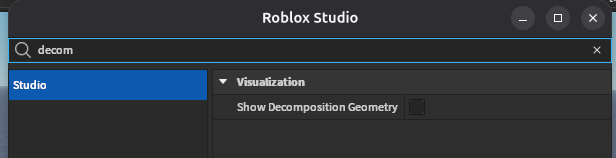
I know this is kinda old, but I do want to inform everyone that a plugin is not necessary. This setting exists in Studio Settings:

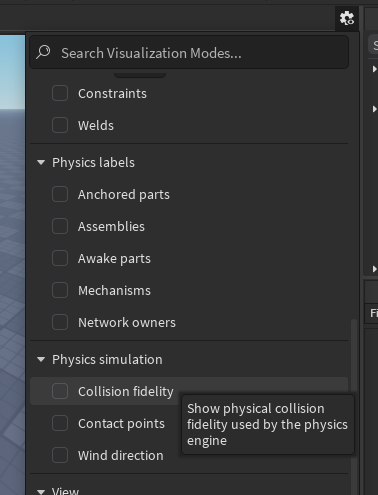
The (relatively new) Visualization Modes panel:

And as a keyboard action which is not bound by default:

decompgeo1

I’m actually not sure if this plugin was ever necessary or if this option is simply almost impossible to find because the search query you’d intuit to bring it up does not actually find it. You have to search “collision” or “physics” or some other word in the shortcut name, not “decomposition” or “geometry” (also, the menu is contextual. You need to have a Place open for it to show this set of actions).

yup i also no longer use this plugin and relay on the new visualization panel

I’m also not sure if toggle collision fidelity was a keyboard shortcut before but i was not able to find it so hence why i made the plugin

but its good to see Roblox now has built in ways to quickly toggle this option :slight_smile:

1 Like
